Contribution
To start using the documentation site and make your own contributions here is a short guide how to set up a local develepment environment.
Setup
Install Ruby
Install Ruby + DevKit from this link.
Ruby+Devkit 3.4.7-1 (x64) was used in this tutorial.
Run the downloaded installer. A cmd windows should appear.
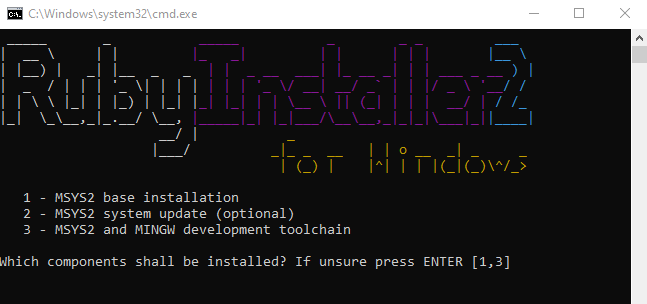
Run all the options in order. After finishing all the installations hit ENTER with an empty argument to exit the installer.
Clone Repository
Open terminal, navigate to your desired folder. Clone the dokumentation repository and step into the folder.
git clone https://github.com/Fortuz/Fortuz.github.io.git
cd Fortuz.github.io/
Install Ruby gems
To install the requred gem dependencies based on the `Gemfile` located in the cloned repository run the following command:
bundle install
Run the site Locally
During the development phase it is easier to run the site locally, observ your changes faster and then just commit the final version.
To run the page locally during the development use the following command:
bundle exec jekyll serve
Useage
Using an IDE like Visual Studio Code is recommended, where the source code, git version control and terminal commands can be easily handled at once.
For more information about the webpage template and how to use it please see the guide.
MinimalMistake template useage guide
Folder structure
In general folders starting with a dash (like `_includes`, `_sass`) are containing the neccesary files for the webpage template itself. modifying them is rarely needed, only if the webpage functionality needs to be altered. Only exception maybe is the `_data` folder in which the `navigation.yml` file contains the main navigation items.
The assets folder contains additional materials for the documentations.
assets/images: all the images involved in the documentation should be stored here.
assets/src: contains the sorce files for some of the imeges if modofications are needed. Drawio files are a concreat example. Drawio was used to generate schematic files and block diagrams.
docs: this folder contains the documentation files.
| Folder/File | Purpose | Modify? |
|---|---|---|
_includes |
Template files | Rarely |
_sass |
Stylesheet files | Rarely |
_data/navigation.yml |
Navigation menu | Yes |
assets/images |
Documentation images | Yes |
assets/src |
Source files (Drawio, etc.) | Yes |
docs |
Documentation content | Yes |
Tip: If the Drawio files does not show after loading them in - sometimes the Dark/Light theme messes with the colors, try to change it.